Effortless Social Media Content Creation: How AI Video Editing Saves You Time
If you create video content for a brand, you know the editing process well.
It can take one to two hours to clean up and edit a five-minute video.
You spend hours trimming and cutting. When you finally finish, you are still not happy with the result.
That's where AI video editing comes in.
What is AI video editing?
AI video editing uses artificial intelligence to automate the editing work. The main tasks AI handles:
Automated editing: AI editors turn raw footage into polished videos in minutes, adding B-rolls, background music, transitions, effects, subtitles, and more.
Scene detection: AI can analyse a video and break it into scenes automatically. That way, you can jump to the section you want without scrubbing through the whole timeline.
Object recognition: AI can spot people, animals, buildings, and other objects in your footage. That makes it easy to apply effects, remove things, or track movement across frames.
Auto-tagging: AI can tag your footage based on what it sees and hears. Tags can include location, people, activities, and objects. This makes a large video library searchable.
Colour correction: AI can read the colour balance and tone of your footage and adjust it. White balance, exposure, contrast, and saturation all get fine-tuned automatically.
Audio enhancement: AI cleans up your audio. Background noise drops out, voice gets clearer, and volume levels balance.
Subtitle generation: AI can transcribe your speech and turn it into subtitles automatically.
Subtitles are one of the highest-leverage edits for social media. No more pausing, rewinding, and typing out what you just said. Vmaker AI can auto-generate subtitles in 35+ languages with 10+ animation styles, and translate them into 100+ languages.
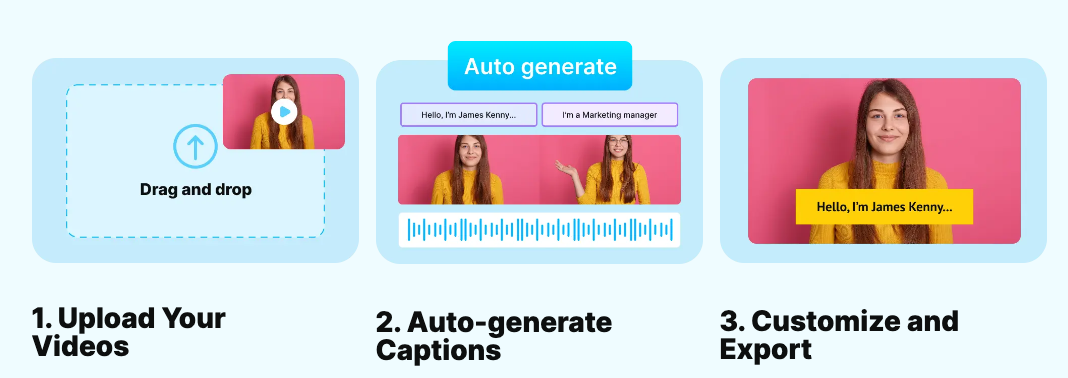
The result: social videos that work even on mute, in any region.
How AI editing changes the way you create video
AI editing reshapes the workflow at every stage. Here are the main shifts.
1. Save time and resources
The biggest win is time saved. According to IBM, 30% of IT professionals use AI to save time and streamline operations.
You no longer spend hours figuring out how to stitch clips together. The AI picks the right footage and assembles it for you.
You also save on the cost of hiring a professional editor.
Vmaker AI is one such editing tool. It cuts editing time roughly in half.
How it works:
- Upload your raw footage, or use the built-in recorder.
- Pick your aspect ratio (vertical, square, or landscape).
- Choose features: subtitles, video titles, animations, transitions, and so on.
- The AI assembles a polished video.
2. Scale your content
Faster editing means more videos.
With AI in the loop, you can publish a much higher volume of content in less time.
Need dozens of social ads? A few weekly instructional videos? AI lets you scale production to match demand.
3. Create polished videos in minutes
Editing used to take hours. AI cuts that to minutes.
You might worry about quality dropping. It does not have to. AI editing tools deliver smooth transitions, engaging graphics, and other high-end touches that make a video feel professional.
To get there, drop your raw footage into Vmaker AI and clean it up using the editing suite. Export at 4K for the highest resolution.
4. Switch between short and long form easily
Many creators stick to short videos because long ones are too time-consuming to edit. They lose the long-form audience as a result.
AI editing closes that gap.
Say you want to record a long YouTube tutorial and also chop it into clips for YouTube Shorts, TikTok, Instagram, and Facebook.
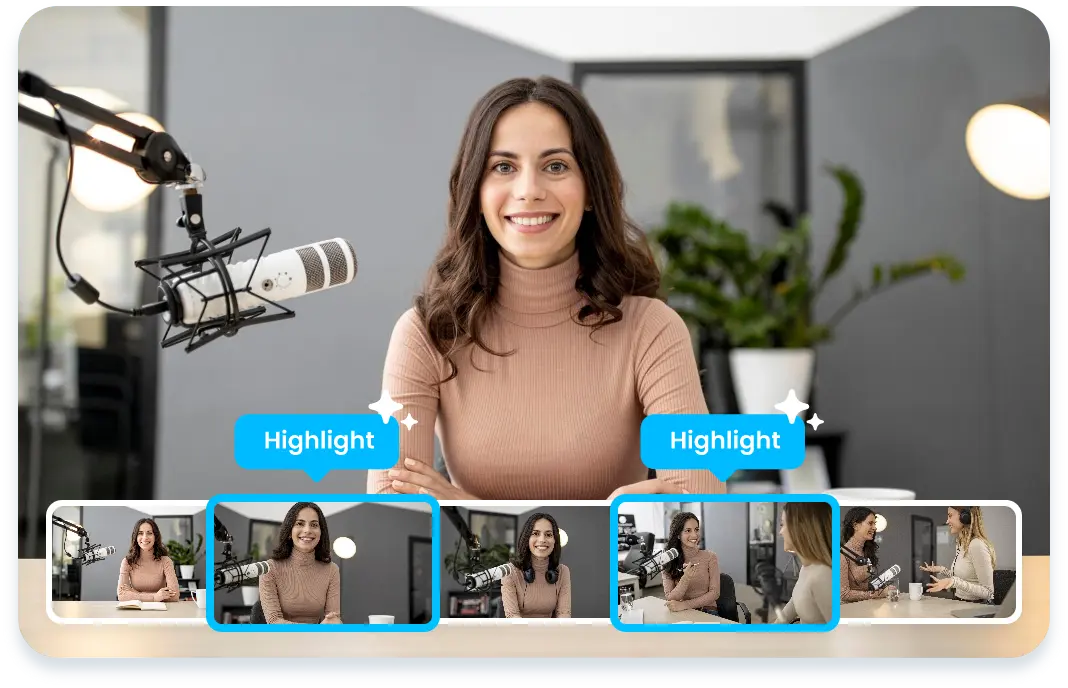
Vmaker AI can convert long videos into shorts and create highlight reels. Upload the long video. The AI finds the best moments and turns them into publish-ready shorts.
The Highlights Generator picks up the high points of your video and stitches them into teasers automatically.
5. Boost creativity with style variations
Worried that AI editing strips out the human touch? It does not have to. AI opens up creative options you might not think of on your own.
You can get dynamic style variations and edit suggestions based on your content type and preferences. Trending visual effects, alternative cuts, music synced to visuals, all generated for you to pick from.
Vmaker AI lets you cycle through editing style variations with one click.
6. Use a wide editing toolkit
AI editors come with both basic and advanced features. Basic: trim, cut, split, resize, rotate, flip. Advanced: audio enhancement and more.
Other features a good AI video editor should cover:
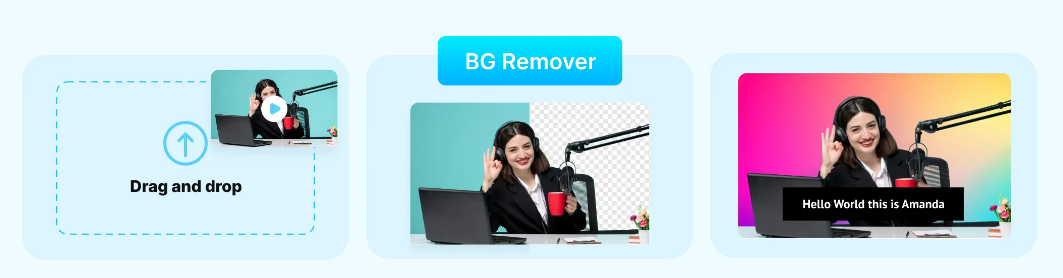
- Background noise removal
- Aspect ratio control
- Subtitles and translations
- Stock photo library
- Colour adjustment
- Reverse playback
- Speed control
7. Integrate with your workflow
The best AI editing tools fit into your existing workflow without friction. That makes collaboration smooth, whether you work alone or with a team.
Vmaker integrates with social platforms so you can publish directly from the editor. You also get the wider Animaker and Picmaker suite alongside it. The stock library pulls from Pexels, Pixabay, Getty Images, and GIPHY.
Best practices for AI video editing
Ready to plug AI into your editing flow? A few practices to make it work.
Set clear goals
Before you switch tools, figure out what you want.
- Are you adding AI subtitles to make videos accessible?
- Trying to lift engagement on your social videos?
- Cutting production time so you can publish more often?
Once you know the goal, you can pick the tool and the features that match.
Pick the right tool
Compare AI editors on features, pricing, ease of use, and how well they fit your stack.
Use the free trials. The Vmaker AI Video Editor is free and a good place to start.
Master the basics
Learn the basic moves first. Importing footage, navigating the interface, and the standard edits:
- Adding transitions
- Trimming
- Cropping
- Cutting
- Merging clips
Experiment with styles
Try different presets, filters, and effects. The first option you try is rarely the best one.
Keep it simple
Modern editors give you a long list of effects and transitions. Less is usually more. Do not clutter the video with effects.
Focus on telling a clear story. The edit serves the story, not the other way around.
Have fun
Above all, enjoy the process. Experiment, try things, and make videos you are proud of.
Over to you
Editing social videos does not have to be slow or painful. AI editing streamlines the process so you can spend more time on the part that matters: connecting with your audience.
Ready to try it? Get started with Vmaker for free.