Contents
WayinVideo vs OpusClip: Winner by Category
Comparison Activity: WayinVideo vs OpusClip
Wayin vs Opus Clip: Which Creates More Value for Creators?
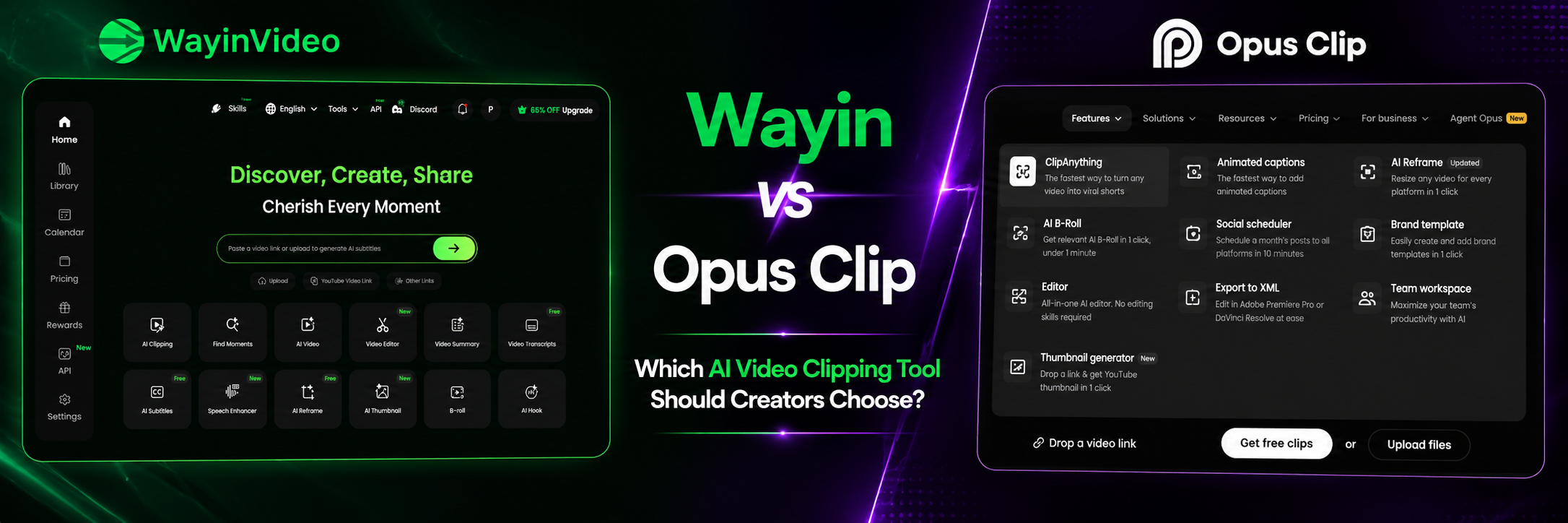
Wayin vs Opus Clip: Which AI Video Clipping Tool Should Creators Choose?
Creators, podcasters, coaches, and marketers are increasingly using AI video clipping tools to turn long-form content into Shorts, Reels, and TikToks.
Two options among others are Wayin and Opus Clip. While both use AI to identify highlights and generate short-form videos, they take very different approaches to content repurposing.
To understand which tool creates more value, we tested both platforms using the same long-form podcast interview and evaluated:
- Number of clips generated
- Processing speed
- Highlight selection quality
- Content repurposing potential
- Overall workflow efficiency
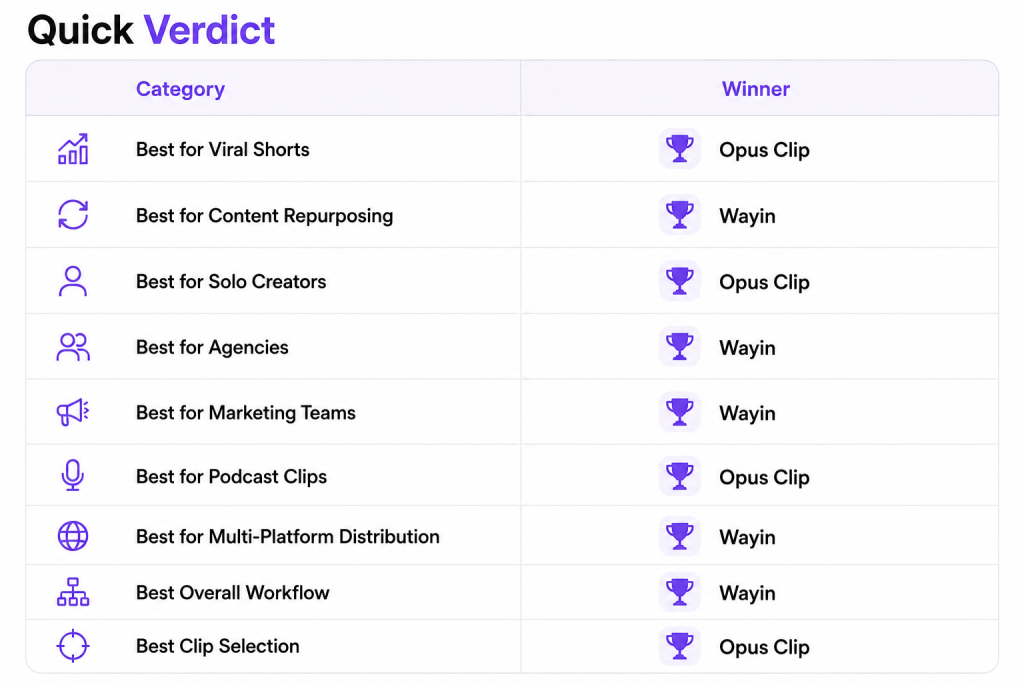
WayinVideo vs OpusClip: Winner by Category
Comparison Activity: WayinVideo vs OpusClip
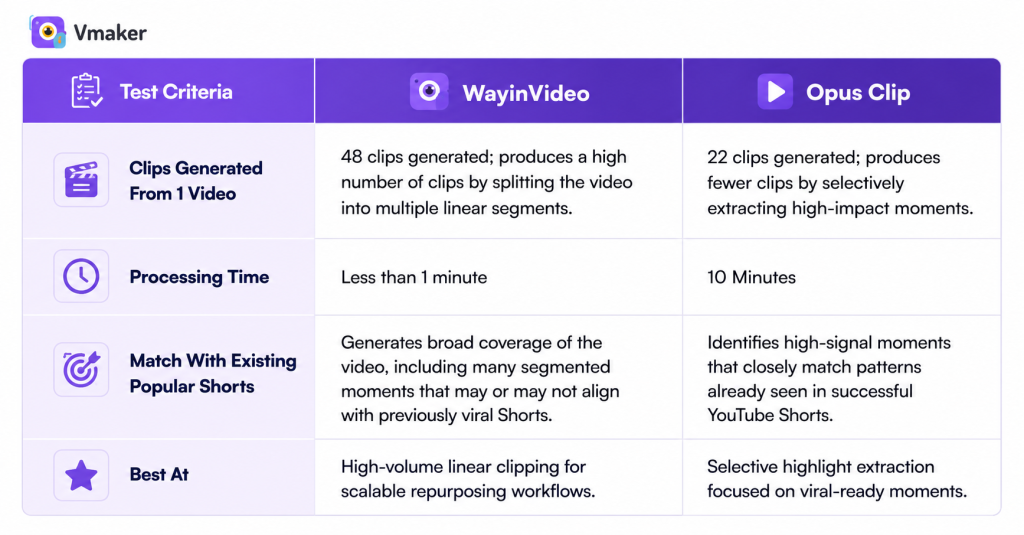
To compare Wayin and Opus Clip, we used the same long-form video and evaluated three factors that matter most to creators:
- How many clips each tool generated from a single video?
- How long did each tool take to process the video?
- Whether the generated clips matched the highlights that already performed well as YouTube Shorts?
Rather than comparing feature lists, we focused on real-world output quality and content repurposing efficiency.
About the long video used: Jay Shetty and Ed Mylett podcast interview
The video features a conversational discussion between Jay Shetty and Ed Mylett on personal growth, success, resilience, and mindset. We selected it because the interview contains multiple story-driven and insight-rich moments that are commonly repurposed into Shorts, Reels, and TikTok clips.
- Video style: Long-form podcast interview
- Duration: 37 minutes 24 seconds
- Genre: Personal development, motivation, and mindset
What did I infer:
- WayinVideo behaves like a coverage-based clipping system, breaking content into many usable fragments.
- OpusClip behaves like a selection-based system, prioritizing fewer but higher-confidence highlight moments.
What Is WayinVideo?
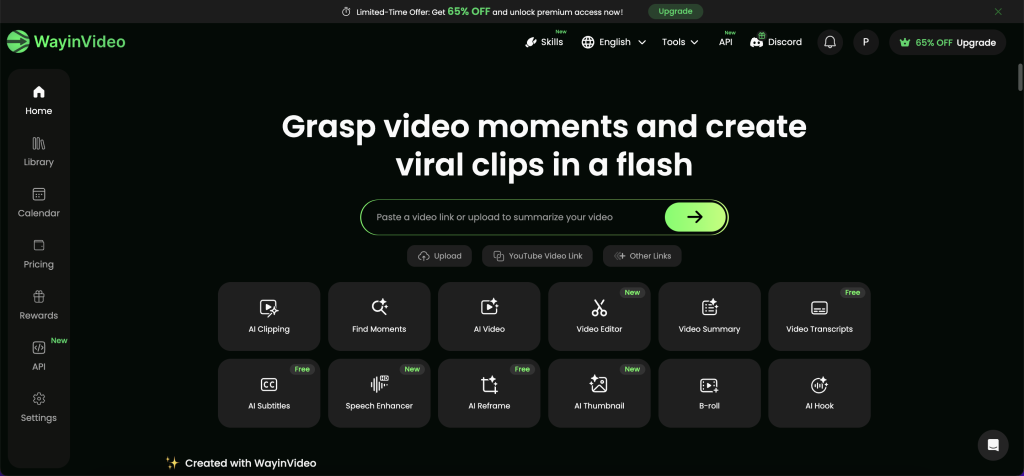
WayinVideo is an AI-powered video clipping and content repurposing platform designed to help creators and teams transform long-form videos into short-form content for multiple social media channels.
Rather than focusing solely on clip generation, Wayin aims to support broader content workflows, including editing, branding, and distribution.
Who It's For
Wayin is best suited for:
- Content creators publishing regularly across platforms.
- Marketing teams managing video content at scale.
- Agencies handling multiple client accounts.
- Businesses repurposing webinars, podcasts, and interviews.
Key Features
- AI clip detection and highlights: Wayin automatically identifies potentially engaging moments from long videos and suggests clips suitable for short-form platforms.
- Captions and subtitles: The platform can generate subtitles automatically, helping creators improve accessibility and viewer retention.
- Editing workflow and brand templates: Users can customize clips using templates, branding elements, and editing tools to maintain consistency across content.
- Multi-platform exports: Wayin supports exports optimized for platforms such as YouTube Shorts, Instagram Reels, TikTok, and LinkedIn.
Pros
- Supports content repurposing: Designed to help creators turn long-form videos into multiple short-form content assets.
- Built for teams: Includes workflow features that can support collaborative content creation and management.
- Brand customization: Offers templates and branding tools to maintain consistency across videos.
- Multi-platform distribution: Supports creating and publishing content for platforms such as YouTube Shorts, Instagram Reels, TikTok, and LinkedIn.
Cons
- Limited advanced editing: Better suited for AI clipping and repurposing than complex timeline-based video editing.
- Performance depends on content type: Clip quality can vary for videos with multiple speakers, rapid cuts, or frequent scene changes.
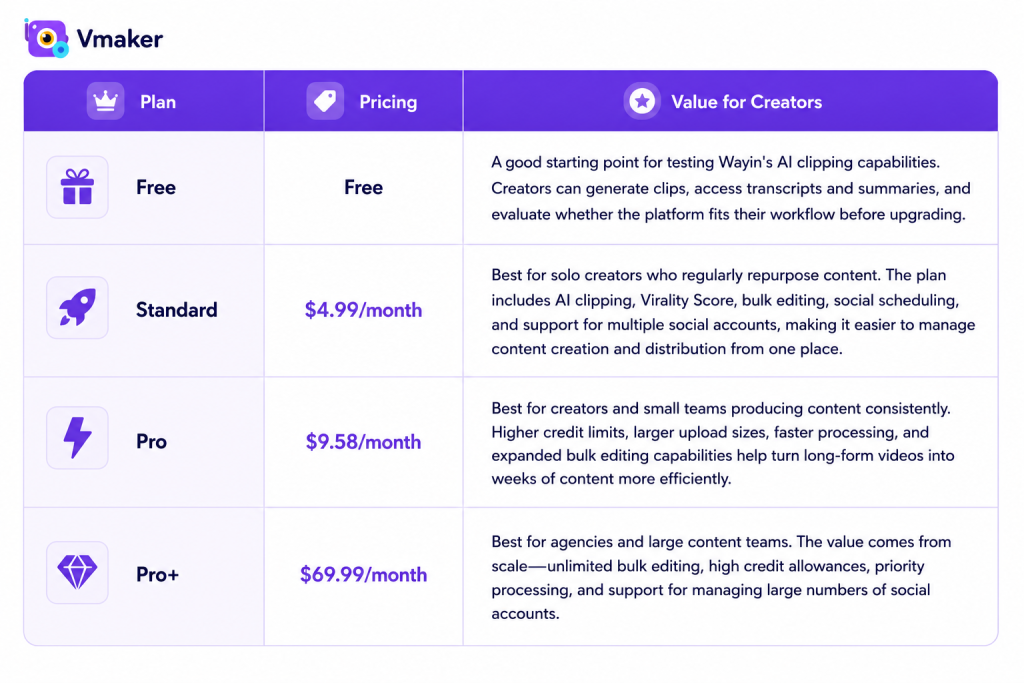
Pricing
Wayin offers multiple pricing tiers. Since plans change periodically, check the official website for current pricing details and feature limits.
What Is OpusClip?
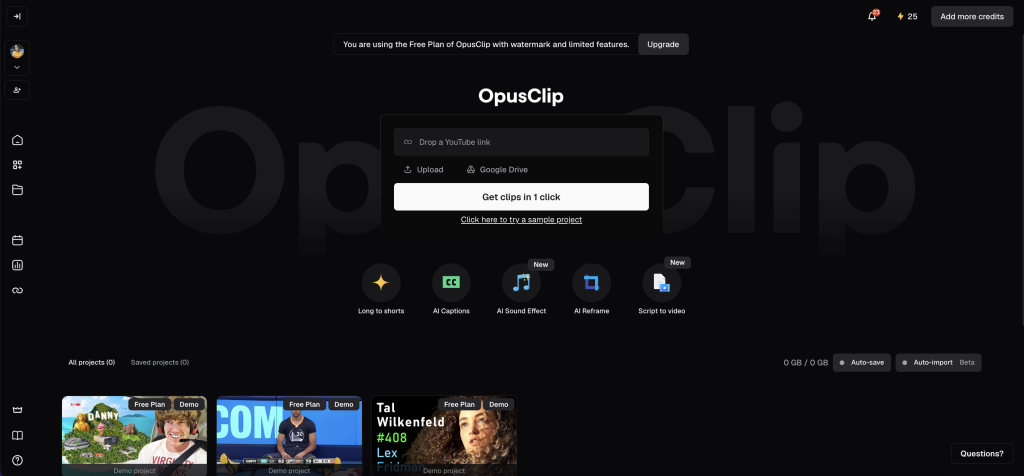
Opus Clip is an AI clipping tool optimized for viral short-form content creation, especially for TikTok, Reels, and YouTube Shorts. It prioritizes engagement-driven editing decisions over full conversational preservation.
Who It's For
Opus Clip is ideal for:
- Solo creators
- YouTubers
- Podcasters
- Coaches and educators
- Users prioritizing speed over extensive editing
Key Features
- AI highlight detection: Opus Clip automatically identifies moments it predicts will perform well as short-form content.
- Auto captions: The platform generates captions automatically to improve engagement and accessibility.
- Short-form social media formatting: Clips are automatically optimized for vertical video formats commonly used on TikTok, Reels, and Shorts.
- Basic editing workflow: Users can make quick edits before exporting clips for publishing.
Pros
- Beginner-friendly interface: Easy to use for creators with little or no video editing experience.
- Minimal editing required: Generates publish-ready clips that often require little manual refinement.
- Built for short-form content: Optimized for creating accurate YouTube Shorts, Instagram Reels, and TikTok videos.
Cons
- Context can be lost: Some clips may feel incomplete because the AI removes surrounding conversation for brevity.
- Costs can increase with usage: Higher-volume creators may need additional credits or paid plans as content output grows.
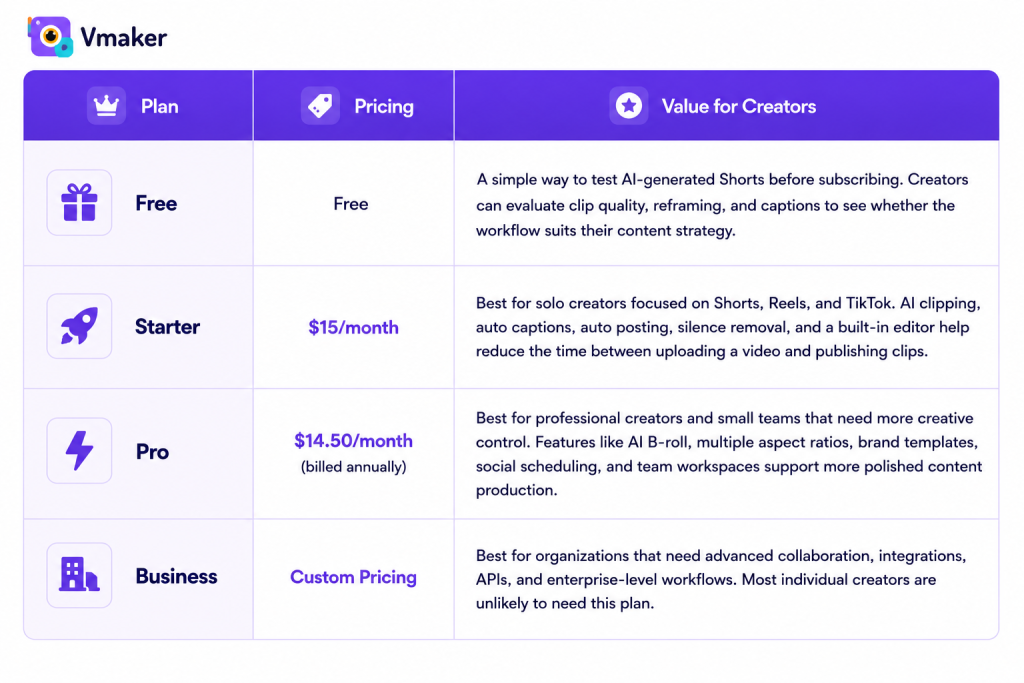
Pricing
Opus Clip provides several subscription plans based on usage and feature requirements. Visit the official pricing page for the latest information.
Wayin vs Opus Clip: Which Creates More Value for Creators?
The answer depends on what type of value you're looking for.
If your goal is to create as many content assets as possible from a single long-form video, Wayin offers stronger value. Its lower entry-level pricing, bulk editing capabilities, social scheduling, and support for multiple social accounts make it well-suited for creators managing content across several platforms. For teams, agencies, and businesses repurposing content at scale, the ability to generate, edit, and distribute a high volume of clips from one dashboard can significantly reduce workflow complexity.
Opus Clip, on the other hand, focuses on identifying attention-grabbing moments and turning them into social-ready clips with minimal manual effort rather than focusing on volume. For creators whose primary goal is growing through YouTube Shorts, Instagram Reels, or TikTok, this streamlined workflow can be more valuable than having additional editing and publishing tools.
Which Tool Creates Better Shorts?
For creators focused on YouTube Shorts, Instagram Reels, and TikTok growth, highlight selection quality matters more than clip volume. In our test, Opus Clip showed these strengths:
- Better at identifying attention-grabbing moments
- Requires less manual review
- Faster path to publishing
Which Tool Creates More Content From One Video?
This is where Wayin stands out. Beyond clip generation, Wayin supports broader content workflows including:
- Bulk clip creation
- Branding
- Editing
- Scheduling
- Distribution
Final Verdict
For most individual creators, Opus Clip delivers more value because it focuses on what matters most: quickly turning long-form videos into engaging Shorts, Reels, and TikToks with minimal editing.
However, if your workflow involves publishing content across multiple channels, managing several brands, or producing content at scale, Wayin delivers better long-term value. Its bulk editing, scheduling, and multi-account management capabilities make it a more complete content repurposing solution.
In short, choose Opus Clip if you want better clips faster, and choose Wayin if you want to produce and distribute more content from every video.
FAQs
Is Wayin better than Opus Clip?
Neither tool is objectively better, it depends on your workflow. Wayin is better suited for creators and teams that need bulk clip generation, content scheduling, and multi-platform publishing. Opus Clip is a stronger choice for creators who want to quickly generate engaging Shorts, Reels, and TikToks with minimal editing.
Which tool is faster for creating Shorts?
Opus Clip is generally faster for creating publish-ready Shorts. Its AI prioritizes high-engagement moments and automatically formats clips for short-form platforms, reducing the amount of manual editing required.
Can these tools auto-create YouTube Shorts?
Yes. Both Wayin and Opus Clip can automatically identify key moments from long-form videos and convert them into vertical clips suitable for YouTube Shorts. They also support captions and social-friendly formatting.
Which tool is better for content repurposing?
Wayin is the stronger option for content repurposing at scale. Features such as bulk editing, social scheduling, and multi-account management make it easier to turn a single video into multiple content assets across platforms.
Which tool is better for podcast clips?
Opus Clip is often a better fit for creators looking to generate engaging podcast highlights quickly. However, Wayin may be more suitable for teams that need a larger volume of clips from each episode and want to manage publishing from a single platform.
Is Wayin cheaper than Opus Clip?
Yes. Wayin's Standard plan starts at $4.99/month, while Opus Clip's Starter plan starts at $15/month. However, pricing should be evaluated alongside workflow needs, since the two tools focus on different use cases.
Who should choose Wayin?
Wayin is best for agencies, marketing teams, multi-platform creators, and businesses that need to produce, edit, and distribute content at scale. Its value comes from workflow efficiency rather than individual clip quality.
Who should choose Opus Clip?
Opus Clip is best for solo creators, YouTubers, podcasters, coaches, and personal brands that want to create Shorts, Reels, and TikToks quickly without spending time reviewing large numbers of clips.