Contents
15 AI-Powered Tools for Faster Video Editing in 2025
The future of video editing has changed dramatically over the last few years, with AI now capable of doing the heavy lifting that used to take hours of manual work.
This guide is a comprehensive list of the best AI video editors on the market today.
To put this together, we reached out directly to the creators behind each tool to gather their insights, capability breakdowns, and what their users say about the product.
The result: a detailed view of the leading AI video editing apps in the market.
- Vmaker AI
- Steve AI
- Movavi
- Invideo
- Deepbrain AI
- Veed
- Capsule
- VideoGen
- Clipchamp
- Simplified
- Kapwing
- Synthesia
- FlexClip
- Pictory AI
- CapCut
| Tool | Top Feature | Mobile App | Free Plan/Trial | Pricing | Rating (G2) |
|---|---|---|---|---|---|
| Vmaker AI |
AI Subtitles AI Auto Editing Highlights Generator AI Text to Video |
No | Free Plan | From $19/month | 4.7 out of 5 |
| Steve AI |
Text to GenAI Video Custom AI Avatar Builder |
No | Free Plan | From $20/month | 4.7 out of 5 |
| Movavi |
Montage Wizard Background Removal |
No | No | From $15/month | 4.5 out of 5 |
| Invideo |
Scene Detection Text-to-video editing |
Yes | Free Plan | From $25/month | 4.5 out of 5 |
| Deepbrain AI |
AI Avatars AI Voiceover |
No | Free Trial | From $30/month | 4.4 out of 5 |
| Veed |
AI Avatars & Subtitles Magic Cut |
Yes | Free Plan | From $42/year | 4.6 out of 5 |
| Capsule |
Instant resizing Auto transcription |
No | Free Plan | From $150/month | - |
| VideoGen |
AI Prompt to Video Script to Video |
No | No | From $5/month | - |
| Clipchamp |
Text-to-Speech generator AI Video Editing |
No | Free Plan | From $10/month | 4.2 out of 5 |
| Simplified |
AI Subtitles Magic resizer |
No | No | From $19/month | 4.6 out of 5 |
| Kapwing |
Repurpose Studio Smart Cut |
No | Free Plan | From $24/month | 4.2 out of 5 |
| Synthesia |
AI Video Assistant Custom Avatars |
No | No | From $29/month | 4.7 out of 5 |
| FlexClip |
Auto Subtitles Text to Speech BG Remover |
No | Free Plan | From $19.99/month | 4.3 out of 5 |
| Pictory AI |
Script to Video Transcribe Videos |
No | Free Trial | From $23/month | 4.7 out of 5 |
| CapCut |
AI Auto Cut Text-to-Speech |
Yes | Free Trial | From $9.99/month | 4.5 out of 5 |
1. Vmaker AI
Vmaker AI is an AI video editor, a real video editor, and the first of its kind.
With Vmaker, you can transform raw video footage into a polished, ready-to-publish video with one click.
Upload your raw footage and Vmaker intelligently adds intro and outro slides, B-rolls, text animations, transitions, stickers, subtitles, background music, zoom-in and zoom-out effects, and more, all with one click.
Vmaker also includes a full editing suite for further customisation, giving you the flexibility to fine-tune the output as needed.
AI Functionalities
Text to Video
Generate AI videos from text prompts with Vmaker AI. Realistic, human-like avatars built into the workflow.
Long videos to short form
Short-form is the dominant format on YouTube and Instagram today. Vmaker AI converts long-form videos into shorts in one click. Use it for Reels, Shorts, or TikTok.
Highlights and teaser generator
Vmaker AI automatically detects highlight sections in your video. Export them as teasers or use them as intros.
AI video background remover
Remove backgrounds from any video in one click using Vmaker's AI Background Remover.
AI subtitles
Vmaker AI lets you add subtitles in 35+ languages in one click, with 100+ style options. Auto-translate into 100+ languages for global audiences.
Manual editing suite
Vmaker AI includes a full editing suite: video cropper, video trimmer, video cutter, video merger, video speed changer, aspect ratio adjustment, add audio, add text, and more.
Top Features:
- MAD AI: endless editing style variations for your output video with one click
- AI Subtitles
- Viral Styles
- AI Video Background Remover
- Timeline Editing
- Audio Enhancement
- Color Adjustments
- Speed Change
- Translations
- Add Audio to Video
- Add Text to Video
- Stock Library
Expert / User Quote about Vmaker AI
"Vmaker AI revolutionises video editing with its advanced AI capabilities, ensuring strong output quality every time."
About the Contributor

RS Raghavan
Founder and CEO of Animaker Inc.
2. Steve AI
Steve AI is a tool designed to transform text into engaging video content. Using advanced AI, it lets users create videos by typing in text. The platform offers a range of templates and customisation options, making it useful for content creators, marketers, and businesses building out their video presence.
Steve AI streamlines content creation, saves time, and produces visually appealing videos that resonate with audiences.
AI Functionalities
Text-to-video conversion
Steve AI's core capability is turning written content into high-quality videos, useful for diversifying content formats.
AI-driven templates
Wide range of AI-generated templates across themes and industries, which simplifies the production process.
Customisation options
Custom fonts, colours, and logos for brand-consistent output.
Automated voiceover
Add narration to videos without recording equipment.
Rich media library
Stock images, videos, and music tracks built into the platform.
User-friendly interface
Designed for novices and professionals alike.
Fast rendering and export
Quick rendering with easy export options for social platforms.
Top Features
- Text to GenAI Video
- Custom AI Avatar Builder
- Prompt to Video (ChatGPT integration)
- 100+ human-like voiceovers
- Page URL to Video
- AI Audio to Video
Expert / User Quote about Steve AI
"Everything everyone else does, in one place for one price. What else do you need to know? Buy it."
About the Contributor

Bhuvanesh
Content Specialist associated with Steve AI
3. Movavi
Movavi Video Editor uses AI for routine editing tasks and creative effects. Movavi adds stickers, transitions, filters, and effects without a steep learning curve, thanks to a clean interface.
AI Functionalities
Magic Enhance and auto correction
Color correction, white balance adjustment, and auto contrast handled by Movavi's AI engine, with presets for adding effects.
Montage Wizard
Drop in raw footage, and Montage Wizard generates a complete video with music in roughly a minute.
Background Removal
The AI algorithm removes backgrounds automatically. Replace with another video or image.
Noise Removal
One-click noise gate and compression for clean audio.
Motion Tracking
Track moving objects, titles, logos, or graphic elements with high precision.
Top Features
- Montage Wizard
- Background Removal
- Noise Removal
- Motion Tracking
- Library of Creative Elements
- Export to Popular Formats and Platforms
Expert / User Quote about Movavi
"Great, simple, and so easy to use. Creating videos is a snap." - Robert (Movavi Video Editor User)
About the Contributor

Victoria Greywing
Victoria, a content manager at an IT company, brings expertise in video production, video marketing, and YouTube promotion. Through her work, she delivers expert content and provides valuable insights.
4. Invideo
Invideo is an AI video editor that lets users create and edit videos with text prompts.
Type in a topic, and Invideo generates the script, builds the scenes, and adds voiceovers. Professional videos in minutes.
AI Functionalities
Generate AI videos like magic
Convert ideas into videos with Invideo AI's editor. Create and edit videos for YouTube, TikTok, Instagram Reels, or any other format. Pick any topic and Invideo AI assembles a publish-ready video.
Edit faster and better with AI
Invideo AI cuts hours from the ideation, creation, and editing process. Make changes via text command: delete scenes, mute or change voiceovers, and more.
Text-to-video editing
Build frequent videos on diverse topics, from archaeology to blockchain or astronomy to branding. Set your social media strategy with videos that get views.
Top Features
- Automated Video Editing
- Voiceovers with Natural Language Processing
- Speech Recognition
- Scene Detection and Recognition
- Auto-Cut and Trimming
- Image and Object Recognition
Expert / User Quote about Invideo
"Possibly the best tool for video-making."
About the Contributor

Sanket Shah
Sanket Shah is the Founder and CEO of Invideo, which he started to bring video creation to every business and personal use case. Sanket's work has led Invideo to serve millions of users across 190 countries.
5. Deepbrain AI
Deepbrain AI is an AI studio for video editing. The free AI video editor enables anyone to create high-quality videos online.
AI Functionalities
AI Studios creates a first video draft in minutes, including the script and footage. Transform ideas into on-brand, on-topic content with the Topic-to-Video feature.
Top Features
- No video editing skills required
- 100+ realistic AI avatars
- AI voiceovers in 80+ languages
Expert / User Quote about Deepbrain AI
"Nice and user friendly experience."
About the Contributor

Matt Han
6. Veed
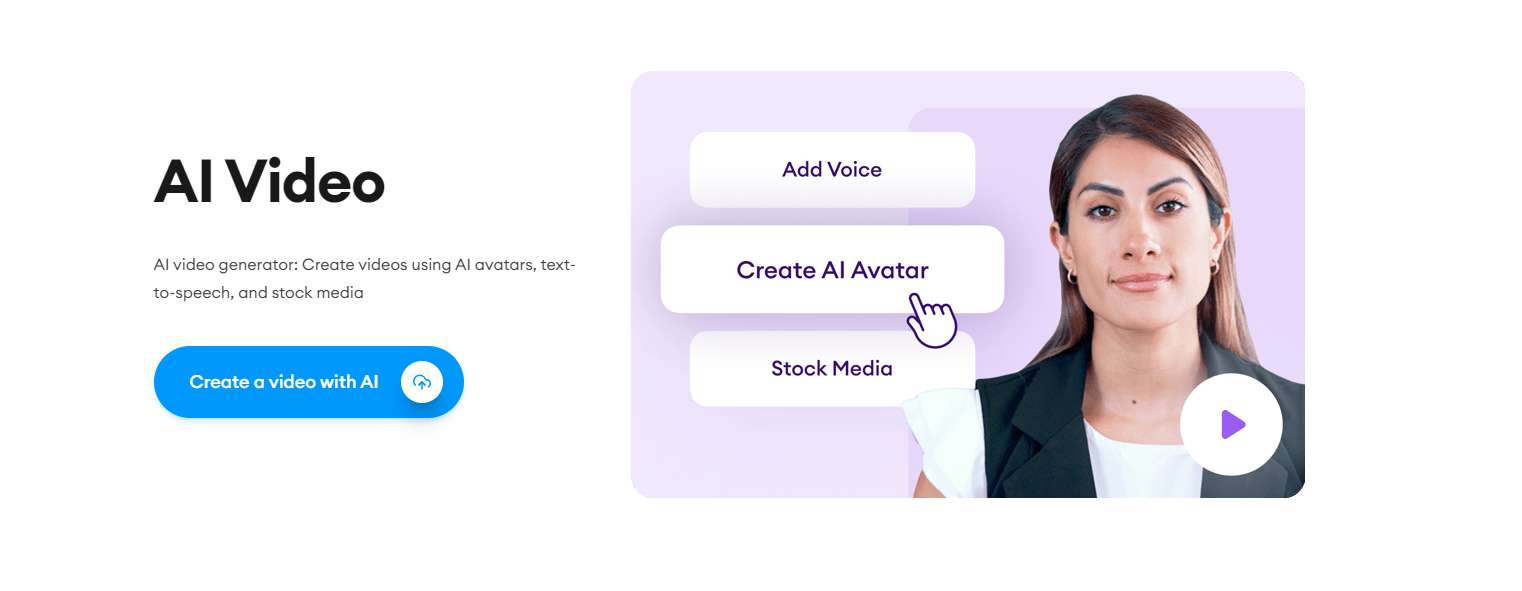
VEED is an online AI-powered video editor with a beginner-friendly interface. Beyond editing, you can also record and host your videos. An all-in-one suite suitable for creators at any skill level.
AI Functionalities
VEED offers a comprehensive suite of AI tools, from automated subtitles to avatars. The AI features help users create professional-level videos faster, all packaged in a user-friendly environment.
Top Features
- Auto Subtitles
- Eye Contact Correction
- Clean Audio
- Voice Cloning
- Voice Translations
- AI Avatars
- Text to Speech
- Magic Cut
- Remove Background
Expert / User Quote about Veed
"Little things that everyone has to do, like cleaning up the audio in the background of their videos. VEED has automated features that use AI to just solve that issue for you."
- Joshua (VEED User)
About the Contributor

Samuel Beek
Samuel Beek is the VP of Product at VEED. He has spent the last decade working on creative and video tooling.
7. Capsule
Capsule is the first video editor built exclusively for enterprise teams. The focus: edit videos 10x faster, keep everyone on brand, and make team collaboration seamless.
AI Functionalities
Capsule helps teams ship videos 10x faster with AI features: soundtrack picker, automatic transcription, text and title suggestions, auto B-roll image generation, auto jump cuts, and more.
Top Features
- Safe zones plus instant resizing for all social platforms
- Text-based interface, edit and format your video like a doc
- Browser-based, accessible to anyone
- Video design systems with custom fonts, logos, and colours
- The fastest way to add motion graphics
- Team collaboration (coming soon)
Expert / User Quote about Capsule
"Whoaaaaa. This is dope."
- Kipp Bodnar, CMO of HubSpot
About the Contributor

Natalie Taylor
Natalie Taylor, Head of Marketing at Capsule.
8. VideoGen
VideoGen generates videos with captions, B-roll footage, music, and AI narration.
AI Functionalities
VideoGen uses computer vision and NLP to generate videos with relevant background footage for each scene. Several state-of-the-art text-to-speech models power the AI voice narration.
Top Features
- AI Prompt to Video
- Script to Video
- Website to Video
- AI Prompt to Image
Expert / User Quote about VideoGen
"VideoGen is an underrated tool for content creators who want to put out the highest quality content in the shortest amount of time."
- Andrew Yu, Content Creator on TikTok (4M+ followers)
About the Contributor

David Grossman
David Grossman is the cofounder of VideoGen and a senior at Brown University studying Applied Math and Computer Science.
9. Clipchamp
Clipchamp is a drag-and-drop online video editor with tools and features for professional-looking videos.
Clipchamp covers everything you need to enhance videos, including AI-powered features like automatic subtitle generation, AI text-to-speech voiceovers, and an AI-assisted slideshow video maker. Plus royalty-free stock footage and video templates to speed up editing.
The user-friendly interface works across browsers and as a Windows app. Clipchamp's free version makes it a popular choice for creators, businesses, and educators.
AI Functionalities
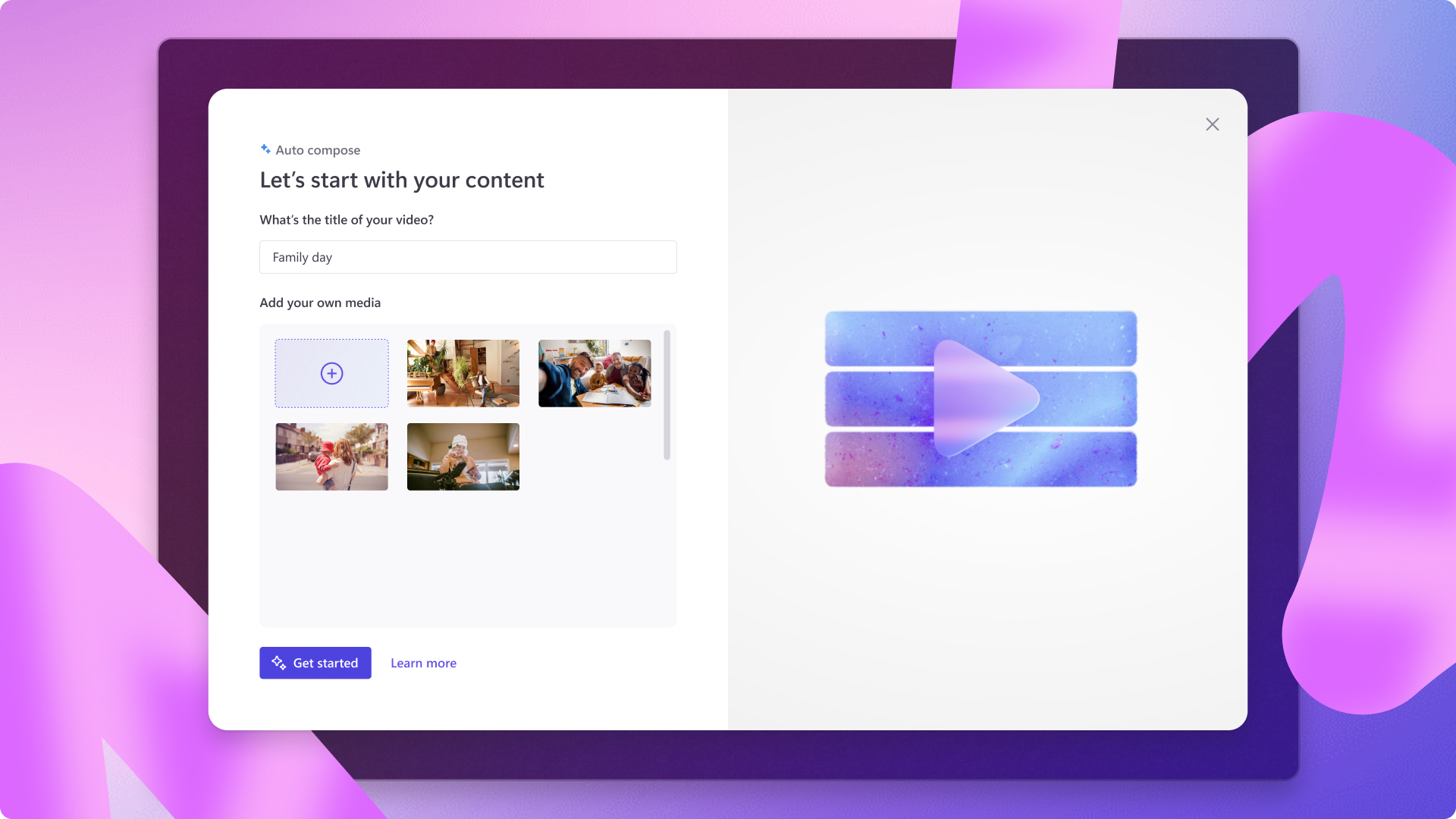
Clipchamp offers a suite of AI-powered features. Autocompose is an AI-driven editor that suggests styles and assembles a video. Text-to-Speech provides realistic AI voices in multiple languages. Autocaptions automatically generates captions in 140+ languages, with customisation for font, colour, alignment, and size. Together, these features make video creation faster and more accessible.
Top Features
AI Video Editor
The Clipchamp AI editor analyses your photos and videos to assemble professional-quality short videos automatically. Auto-composition, theme selection, and customisation for aspect ratio, length, and background music. Download the video as-is or refine in the timeline editor. Useful for slideshow videos and batch highlight videos for social.
Text-to-Speech generator
Realistic AI voices in global languages for professional voiceovers. Adjust vocal pitch to match the mood of your video.
Autocaptions
Automatic subtitles in 140+ languages with full customisation. Transcript generation and editing tools let you fine-tune the output. Export the video with subtitles or download the transcript on its own.
Expert / User Quote about Clipchamp
"My favourite AI feature in Clipchamp is the flawless text-to-speech generator. Creating AI voiceovers in Clipchamp has taken my videos to the next level. Previously I spent a lot of time recording my audio for YouTube and TikTok videos, but this feature really speeds up my video editing workflow. I love how incredibly easy it is to write a script and make a voiceover. It's made my content more engaging and accessible."
- Paige, YouTuber
About the Contributor
Gladys Labsan
Gladys Labsan is a writer, self-taught artist, and Clipchamp video editing expert.
10. Simplified
Simplified is built for fast, efficient video creation and editing. AI features include automatic subtitling, text-to-speech in multiple languages, professional transitions and animations, a Magic Resizer for adapting videos to social formats, a one-click subtitle generator, and a library of templates and sound effects.
AI Functionalities
Simplified's AI suite covers automatic subtitling, AI-driven text-to-speech in multiple languages, and a range of pro transitions and animations. The Magic Resizer adapts videos to different social formats, with free music and sound effects available.
Top Features
- AI Subtitles
- Text to Speech
- AI Clips
- Magic Resizer
Expert / User Quote about Simplified
"Easy to create a short video, with a lot of templates, images, and video clips."
- Dany
About the Contributor

Himanshu Kumar
Himanshu Kumar is an SEO Specialist at Simplified.
11. Kapwing
Kapwing is a web-native video editing platform with a strong AI feature set. The AI focus: helping marketing teams create and edit videos 10x faster than manual work.
AI Functionalities
Kapwing AI is a suite of video creation tools that helps marketers (1) edit 10x faster by removing tedious editing steps, and (2) turn ideas into content with generative tech.
Repurpose Studio and Magic Create make it fast to repurpose or create social-ready videos from scratch.
Kapwing's partnerships with leading providers like ElevenLabs power premium AI-generated voices and voice cloning inside the platform.
Top Features
Repurpose Studio
One AI-powered tool that handles three editing workflows: (1) find engaging highlights from any long video, (2) automatically keep active speakers in frame, and (3) resize and reformat the final clip for any social platform.
Smart Cut
Automatically detects and removes awkward silences and pauses from your video in seconds.
Trim with Transcript
Edit a video like a text doc. Remove sections, clips, or individual words from the auto-generated transcript, and the video updates to match.
Expert / User Quote about Kapwing
"Kapwing Pro is less than $200 a year and I frequently think it's worth that in a single day."
- Michelle Excell
About the Contributor

Gregory Ciotti
Gregory Ciotti, Head of Content at Kapwing.
12. Synthesia
Synthesia is an AI video generation platform. The AI Video Generator enables users to create professional videos without microphones, cameras, actors, or studios.
AI Functionalities
Synthesia uses state-of-the-art machine learning to produce lifelike AI avatars that present in any video, with human-like speech, facial expressions, and body movements in virtually any language. LLMs power the AI Video Assistant, which writes, builds, and translates your video in a few clicks.
Top Features
- 150+ diverse avatars
- 120+ languages and accents
- Custom avatars
- Voice cloning
- Document-to-video generation
- Live collaboration and workspaces
- AI-powered video editing
Expert / User Quote about Synthesia
"I've never even used a tutorial, because the platform is so easy to use. This actually is the first time in my career that I've been an early adopter of new technology."
- Frank van der Grijspaarde, Global TPM Manager of Customer Service and Logistics at Heineken
About the Contributor

Sam Ettleman
Sam Ettleman, Video Content Creator at Synthesia.
13. FlexClip
FlexClip is an online AI video editing platform that integrates AI to streamline video creation. AI-driven tools help with text-to-video, blog-to-video, text-to-speech, and text animations. FlexClip also has a strong template library with customisable options for various video types.
AI Functionalities
- AI Text-to-Video, Blog-to-Video, and Script-to-Video
- AI Auto Subtitles and AI Text-to-Speech: 140+ languages, 400+ voices
- AI Image Generator: turn words into images
Top Features
- Auto Subtitles
- Text to Speech
- Image Background Remover
- AI Text to Video
- Script to Video
- Blog to Video
- Speed Curve
- Split Screen Video
- 5,000+ video templates
Expert / User Quote about FlexClip
"FlexClip is the easiest video editing solution for beginners. I've experienced various video editing apps on Android. FlexClip's AI tools are groundbreaking, and one of my favourites is AI Text to Video. FlexClip caters to a range of users, from beginners to professionals."
- Muhammad Hamza, YouTuber
About the Contributor

Sammy
Sammy, PR from FlexClip.
14. Pictory AI
Pictory.ai enables anyone to create videos from text or edit existing videos using AI. Used by content creators, marketers, and L&D professionals to tell stories in video format quickly and at low cost. Cloud-based, so there's no software to install. Sign up for free to get started.
AI Functionalities
AI does the heavy lifting throughout the product. From selecting the right video clip from the library of 10 million+ Getty Images videos, to creating voiceovers using hyper-realistic voices from ElevenLabs. The ChatGPT plugin lets users create videos from text directly inside ChatGPT.
Top Features
- Script to Video
- Automatic Captions
- Auto-create short videos from long videos
- Blog Post to Video
- Transcribe Videos
- Edit Video Using Text
Expert / User Quote about Pictory
"Pictory has been absolutely fantastic for generating content that is engaging for learners, teachers, and managers."
- Simon from Seren Skills
About the Contributor

Pete Bennett, Head of Growth at Pictory.ai.
15. CapCut
CapCut is an all-in-one creative platform powered by AI, with video editing and image design across browser, Windows, Mac, Android, and iOS.
CapCut is owned by ByteDance, the same parent company as TikTok. The app was briefly removed from US app stores in January 2025 under the Protecting Americans from Foreign Adversary Controlled Applications Act (PAFACA). It returned within days following an executive order delaying enforcement, and is currently available in the US, though the underlying legal framework remains unresolved. CapCut has been permanently banned in India since 2020.
AI Functionalities
- AI Auto Cut
- AI Background Remover
- AI Text-to-Speech
- AI Speech-to-Text (captions)
- AI Face Retouching and Beautification
- AI Music Beat Sync
Expert / User Quote about CapCut
"CapCut's fast, easy, powerful, mobile-focused video editing tools make it a great way to up your TikTok production value."
To wrap up: we put significant effort into engaging directly with creators to bring you trustworthy information about the best AI video editors on the market.
From talking to creators to exploring unique AI capabilities, we covered every angle. As technology advances, AI tools are reshaping every part of video creation.
Use this list to make an informed decision about the AI video editing software that fits your work. For content marketers, a video-to-text converter helps turn visual material into blog posts, email copy, or SEO-optimised articles.
Now go explore.