
Contents
What is search engine optimization?
What can video content bring to SEO marketing?
Steps to integrate video into your SEO strategy
How to Integrate Video Into Your SEO Marketing Strategy
High-quality content is the core of content marketing, which is tightly connected to SEO. To rank first in the SERP, you need outstanding content that beats the competition. On the modern web, good content is not just a long article. It is content that is relevant and easy to consume.
Video is one of the most effective ways to deliver information. It is far easier to understand a photo-editing tutorial by watching a video than by reading about it. Video is a powerful tool for making better content. Let's look at exactly how video can boost your SEO and how to do it.
What is search engine optimization?
To improve rankings, let's briefly review the principles of SEO.
Generally, to rank #1 in the SERP, you need to outperform competitors across the board by following a few core principles:
- First, you need a fast and accessible website.
- Second, you need valuable content that fulfils user intent.
- Third, you need high-quality backlinks earned from trusted, relevant sources. Focus on earning links through genuinely useful content rather than buying them, since paid links violate search engine guidelines and put your rankings at risk.
Becoming #1 in the SERP takes a lot of work, and there are professional SEO platforms and tools that help with webpage and video optimisation. Use a keyword research tool you trust, or work with a consultant who specialises in your niche.
Videos do not improve a website's technical performance and have little impact on off-page SEO, but they are powerful for page value and content quality. To increase a page's quality, the video itself needs to bring value and be optimised for search. Let's examine why and how to integrate video into your SEO strategy.
What can video content bring to SEO marketing?
Online video now makes up the large majority of all consumer internet traffic, and the most popular social platforms (YouTube, TikTok, Instagram) are built around video. Video is the content format users prefer most.
Implementing video on a page increases its quality because it delivers content the way users prefer to consume it. It also means users spend more time on the page watching, which increases overall time on page.
Another benefit is content diversity. A page with a single content type (only text, only images, or only video) is less engaging than one that combines formats. Mixing video with text and images raises the overall content quality, which is a signal Google rewards.
There is more. Video helps establish a connection between you and your users, which builds trust in your site and increases conversion rate. Video is also the most shareable content format, so it is easier to earn a backlink to a video than to a plain page.
Google rich results for videos
Beyond increasing a page's value and boosting its position, videos can generate organic traffic on their own. Video results can take up a significant share of all search results:
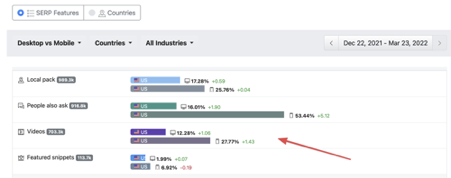
Videos can appear in search results in several ways. Many of them display above the #1 classic search result, so they get more impressions than the top-ranked page. Let's look at how videos appear in a SERP.
Featured snippet (clip)
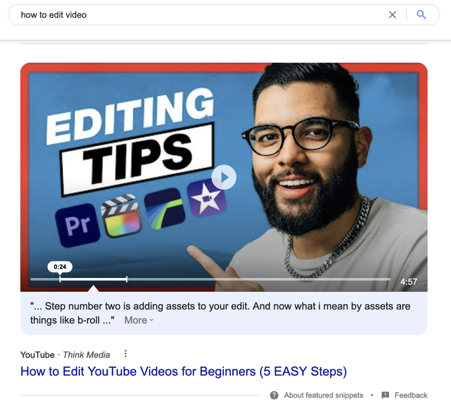
This result is mostly used for videos that contain a fast answer to a search query. The video displays at the very top of the search results, with the relevant part highlighted and its transcription available. To get there, mention the keyword in the video and include it in the subtitles so Google understands it better.
List of videos
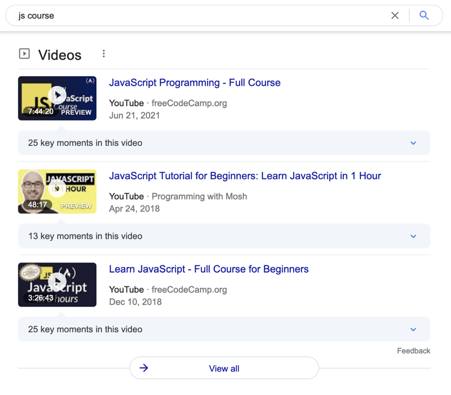
For some queries, videos are the most relevant type of answer. When several videos can fulfil the request, they display in a list format, similar to YouTube search results or the Google "Video" section.
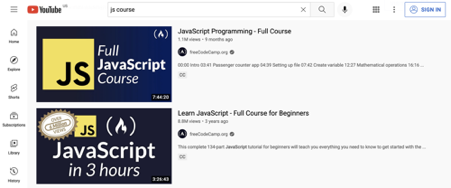
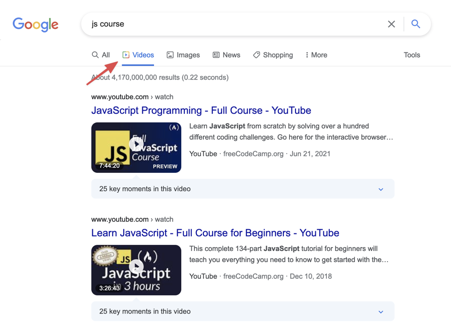
To get there, create a video that ranks high on YouTube. That way your video also shows up in Google search results with no extra effort.
Thumbnail
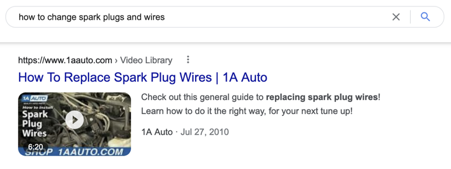
This is how the result looks when a page with video reaches the SERP. Even though most of these pages use YouTube videos, you can make your own page appear this way by correctly embedding the video (covered below).
Steps to integrate video into your SEO strategy
We are not going to cover how to record and edit video here. Instead, here are best practices for optimising your videos for search.
Perform keyword research and create a content plan
Before you create any videos, understand what you are making and why. The best way to do this is keyword research, which tells you which topics are most in demand for video content.
Use any keyword research tool and look at the SERP features for your target keywords. A video or YouTube icon in the SERP features means that the search results for that keyword contain video.
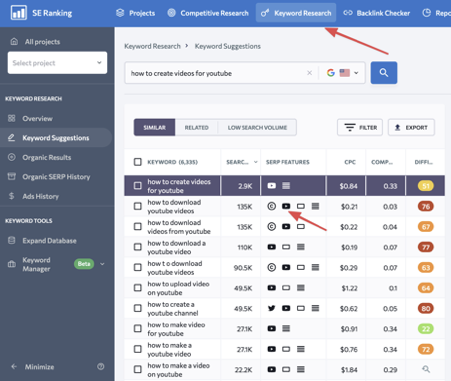
If videos appear in the search results, video answers are highly relevant for that query. By adding a video to the landing page targeting that keyword, you increase its value for users and its quality signal for Google.
To build a content plan, check your focus keywords. Which queries have video results? For those pages, create a relevant video if you want to compete for #1.
If this sounds like a lot of work, you can engage an SEO consultant or agency to handle the keyword research and content plan.
Include keywords in the video and metadata
Once you have your keywords, use them in several places:
- Title and description. Like a web page's title and description, this data has a big impact on video rankings. Use the main keyword in the title and a few secondary keywords in the description.
- Chapters. Treat YouTube chapters like the H2s of an article. The H1 describes the page as a whole; H2s divide it into logical subtopics. Name chapters using the main keywords of each subtopic.
- Speech and subtitles. This is your body text, like the paragraphs in an article. Use long-tail keywords here to maximise topic coverage.
- Tags. Tags play a minimal role now, similar to the old meta keywords tag. Google notes that tags can help if your content is commonly misspelled, but otherwise they play a small role. Still, adding a few relevant keyword tags costs nothing.
Record and edit videos
Create video content that complements your topic and fits your audience. Videos should be relevant to the page's topic, provide information users cannot easily find elsewhere (insider tips, product demonstrations), and be well-produced and well-edited.
One effective and easy-to-produce format is to record a video call in interview format. It fits almost any topic and tends to perform well with viewers.
Add accurate subtitles
Google's search spiders handle text best. For video, Google understands the content by automatically generating subtitles from the audio and evaluating that text.
Auto-generated subtitles are decent but not perfect. To help Google understand your content better, review and correct the subtitles. It takes some time but improves the quality signal of the video. The AI subtitle generator produces accurate subtitles in 35+ languages, which gives you a strong starting point to edit from rather than writing from a blank page.
Create a catchy thumbnail
An engaging thumbnail greatly increases the chance of a video being played. A few quick tips:
- Use 1280x720 resolution.
- Make it emotional.
- Use a consistent layout and branding.
- Use fonts large enough to read on mobile.
How does a thumbnail affect SEO? When a user interacts with your content, that is a signal to Google that they found something interesting, which confirms the page has value. By making engaging thumbnails, you increase your page quality indirectly.
Add structured data
Structured data from Schema.org helps search engines understand your content, and it can produce rich results in the SERP for some queries. Use the VideoObject documentation from Schema.org to add the markup. For YouTube videos, several tools can pull the data automatically so you do not have to build the markup by hand.
Embed the video on your page correctly
Embed the video using a standard method that search engines can crawl, and pair it with VideoObject structured data so Google can identify the video, its thumbnail, duration, and description. Whether you use a YouTube embed or a self-hosted video, the structured data is what makes the video eligible for video rich results.
Promote your video
Videos, like web pages, earn Google's trust when they are referenced elsewhere on the web. A cost-effective approach is community engagement: genuinely answering relevant questions on platforms like Reddit and Quora with a link to your video or the page hosting it. Done authentically, this earns quality links and brings referral traffic.
Video is the most shareable content format, which makes social media promotion highly effective. Strong videos spread fast, so lean into that advantage. Paid social ads are also effective for video, since video engages users and lets you demonstrate value quickly.
Measure performance
YouTube Studio is the best tool for video analytics. It shows you whether a video is performing and where viewers drop off.
For SEO, it is also important to know how users interact with the video on your page. Set up Google Analytics and Google Tag Manager to track events when a user clicks the video. That tells you how many users are actually interested, so you can improve it (perhaps the thumbnail needs work).
You can also use custom URLs with UTM parameters in your YouTube description. Visitors who reach your site from a YouTube video get assigned to that campaign, so you can track their behaviour and conversions as a separate segment.
Wrapping up
Content is the cornerstone of SEO, and video adds significant content value. By integrating video, you get a better page and open new traffic channels: rich results, video search, and YouTube. If you are still unsure whether to add video, the answer is yes. It takes time and effort, but the return is substantial. The sooner you start, the sooner you benefit.