Contents
The Real Problem With AI Avatars
What "Real Enough" Actually Means
Using Colossyan: Efficient and Structured, With Trade-offs
The Real Differences That Matter!
Why Layout and Composition Quietly Affect Realism
To Whom These Tools Are Put to Better Use?
Do AI Avatars Feel Real Enough? A Practical Look at Vmaker AI vs Colossyan
If you've ever watched an AI avatar video and felt slightly distracted without knowing why, you're not alone. Everything may look fine on the surface. The voice is clear, the script is logical, the avatar seems to act like a person. And yet attention slips.
That's when you stop listening to the message and start noticing the delivery. The lips, the timing, the rhythm, and even noticing a minute difference can become another job.
That's the moment where AI avatars either work, or quietly fail.
I've spent time using both Vmaker AI and Colossyan, two tools that promise similar outcomes but feel very different once you watch the finished videos the way real employees do. This comparison isn't about feature checklists or pricing tables. It's about what happens when a learner sits through the video.
This perspective matters most for L&D and internal communications teams, where trust, clarity, and sustained attention are non-negotiable.
The Real Problem With AI Avatars
Most blogs talk about AI avatars as a productivity win, i.e. faster videos, lower costs, no cameras, and no retakes.
That part is already solved. The real problem comes with the viewer's tolerance.
People don't hate AI avatars, but they don't ignore them either. The moment an avatar feels slightly unnatural, the viewer's brain shifts focus. Instead of absorbing information, they start evaluating the presenter. And once that happens, engagement drops.
This is especially risky for:
- Training videos.
- Onboarding content.
- Internal communications.
- Educational explainers.
- Brand-facing content.
In these cases, the presenter needs to feel trustworthy. Not impressive, and not futuristic, just normal.
What "Real Enough" Actually Means
When people say they want a "realistic" AI avatar, they usually don't mean photorealism.
They mean:
- The lips hit the right syllables.
- Facial expressions don't jump suddenly.
- The tone matches what's being said.
- Nothing pulls attention away from the message.
It's killed by a lot of micro-signals. Individually, they're minor. Together, they decide whether the avatar fades into the background or becomes the main distraction.
This is where Vmaker AI and Colossyan start to diverge.
Using Colossyan: Efficient and Structured, With Trade-offs
Colossyan is built for efficiency. The workflow is straightforward: choose a template, select an avatar, paste the script, and generate the video.
For short clips and standardized messages, this works well.
In longer videos, patterns become more noticeable, gestures repeat, facial expressions can shift abruptly. In some cases, lip-sync feels slightly delayed or overly precise, which paradoxically makes it more noticeable.
The result is not broken or unusable output. It's simply more visible as an AI-generated presenter, especially as runtime increases.
Where Viewers May Start Noticing Friction
Most users report positive experiences with Colossyan, particularly noting its clean, intuitive workflow and ease of video creation. However, another set of users point out limitations in the AI avatars, especially during extended or more nuanced use cases.
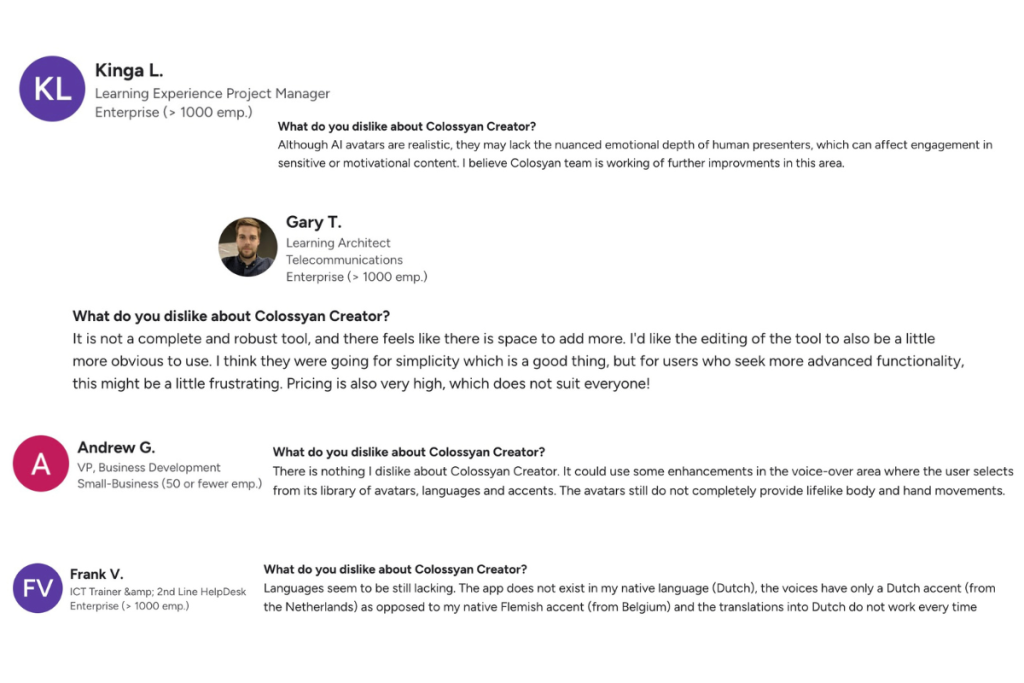
Based on usage:
- Expression changes that feel mechanical.
- Minor lip-sync timing inconsistencies.
- Emotional flatness in serious or instructional content.
- Less stable delivery across some non-English languages.
None of these observations makes the tool unusable. But it does limit where the videos work best.
What I Liked About Colossyan
- Quick onboarding with minimal learning curve.
- Template-driven workflow reduces decision fatigue.
- Clean, professional avatars at first glance.
- Reliable for English-language videos.
- Predictable output for standardized formats.
What I Disliked About Colossyan
- Repetition becomes noticeable in longer videos.
- Subtle realism gaps surface with extended viewing.
- Less flexibility in pacing and delivery control.
Experience Using Vmaker AI
Vmaker AI has its share of users noting software bugs and interface improvements.
But its approach towards AI avatar has a lot of scope for L&D teams. Instead of relying heavily on templates, they focus on delivery flow. Avatar's movement lacks, but facial expressions transition smoothly, and speech pacing feels calm and controlled rather than compressed.
The result is not a more impressive avatar, it's a less noticeable one. In longer videos, this restraint matters. The presenter doesn't draw attention to itself. The viewer stays focused on the message, which is exactly what L&D content needs.
What I Liked About Vmaker AI
- Avatars deliver scripts with steady pacing and a calm, natural presence.
- Facial expressions transition smoothly instead of snapping between states.
- 100+ Avatars Available Speaking 35+ Global Languages.
- Lip-sync stays accurate and aligned across multiple languages.
- Holds up well in training, onboarding, and long-form content.
What I Disliked About Vmaker AI
- No templated formats available.
By making use of Vmaker AI, across training and onboarding videos, teams report that mouth movements stay aligned with speech and transcriptions closely match spoken language, even in multilingual content. Review feedback tends to focus on content clarity rather than technical corrections.
The Multilingual Test
If all your content is in English, both tools are usable. The difference becomes clearer when you produce training across regions.
In hands-on usage, Colossyan performs strongest in English. In other languages, pacing and articulation can vary, which sometimes makes delivery feel less natural.
Vmaker AI holds up more consistently across 35+ global languages. Lip movements stay aligned, rhythm remains stable, and delivery feels intentional rather than adapted.
For global L&D teams, this isn't cosmetic, it affects comprehension and rework.
The Real Differences That Matter!
Lip-Sync Quality: Custom Avatars in Real Use
Vmaker AI
- Custom avatars maintain tight lip-sync even in longer videos.
- Mouth movements stay aligned with syllables instead of drifting over time.
- Speech pacing feels natural, not rushed or clipped.
- Performs consistently across different tones, from instructional to conversational.
- Holds up well in multilingual scripts without noticeable desynchronization.
Colossyan
- Lip-sync shifts in longer videos.
- Slight alignment issues become noticeable as video length increases.
- Non-English languages can feel less precise in articulation.
- Longer scripts increase the chance of timing drift.
Video Length Support: Practical Limits That Matter
Colossyan
- Video duration is restricted based on plan.
- Maximum video length per video:
- Free: 3 minutes
- Starter: 5 minutes
- Business: 10 minutes
- Enterprise: Custom
- Monthly video generation limits apply on lower plans.
- Longer training or onboarding content often needs to be split into multiple videos.
Vmaker AI
- No fixed timeline duration limit per video.
- Supports creating longer, continuous videos without forced scene breaks.
- Better suited for:
- End-to-end training modules
- Onboarding walkthroughs
- Detailed explainers
- Long-form internal communication
- Allows teams to think in terms of content flow rather than time caps.
Why Layout and Composition Quietly Affect Realism
One thing that often gets overlooked in AI avatar comparisons is video composition. An avatar can be perfectly animated, but if the layout feels like a slideshow, the illusion breaks.
Vmaker AI gives more flexibility in how scenes are framed and structured. Videos feel closer to real recordings instead of templated presentations, with b-rolls, talking-head avatars, background music, transitions, and more. Colossyan's layouts are clean but predictable. Over time, that predictability makes videos feel manufactured.
To Whom These Tools Are Put to Better Use?
Here's the simplest way to think about it:
- Colossyan is a scene based video creation and editing platform, good when you need something quick and the content itself isn't high-stakes.
- Vmaker AI is a timeline based video creation and editing platform which is better when the video needs to hold attention, sound credible, and work across languages.
Most importantly, if the viewer's trust matters, realism matters.
Final Thoughts
To concise this read, AI avatars are no longer defined by novelty, the way they recite context matters the most. Minor inconsistencies like lip-sync drift, abrupt expressions, and pacing issues can pull attention away, especially in longer or multilingual videos.
For L&D and internal communications teams, this distinction is critical. Ultimately, the choice of tool should reflect the stakes of the content: when comprehension, engagement, and trust matter, subtle realism and consistent delivery outweigh speed or templated convenience.
Disclaimer: The observations in this blog are drawn from user reviews and hands-on testing of the basic versions of the tools.